
So, you have just installed the Trimlight app and are exploring its basic features, such as picking colors, changing patterns, and turning the lights on. You may want to know what all the hype is about.
But let us tell you the truth nobody tells you upfront: The lights are only half the story. The Trimlight app is where the actual magic happens. And you know what’s more surprising? People who have had Trimlight for months are using only 25% of the features and are unaware of most of its magic.
Creating custom lighting scenes and adjusting brightness and animation speed are just some of their basic features. And that’s where the fun begins.
Before you get more surprised, let us explore all the wonderful features of the Trimlight app. So, just grab your phone first and open the app.
What is the Trimlight app?
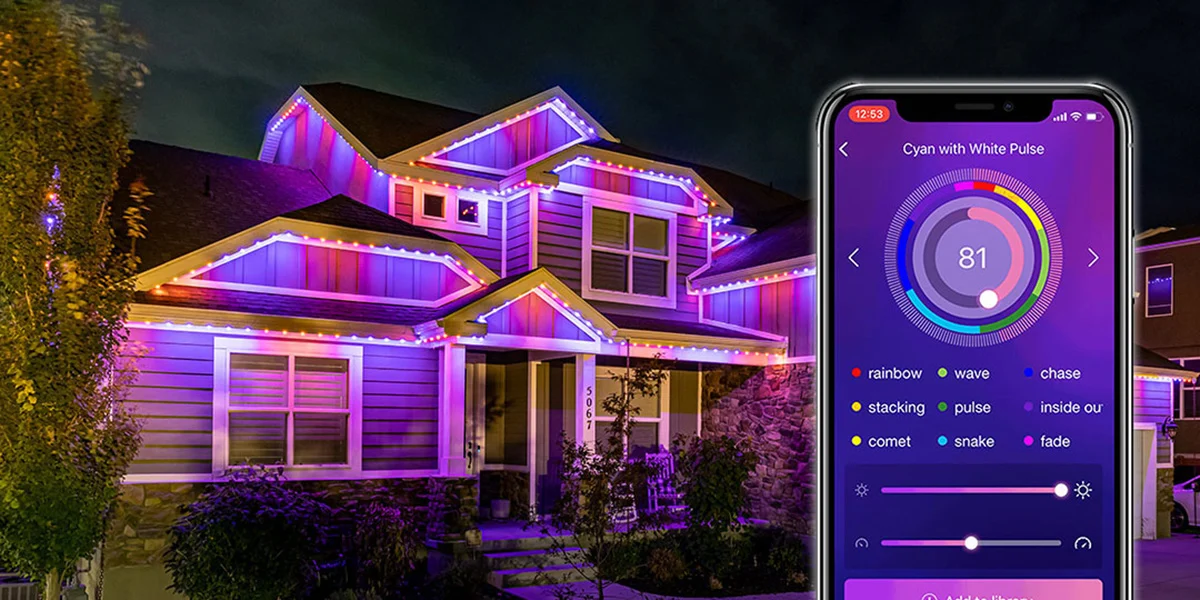
The Trimlight app basically works like a remote control for your permanent LED outdoor lighting system.
Now you don’t need to climb ladders every Christmas and change the bulbs; you can simply control the lights from your phone. By using the app, you can:
- Choose colors and lighting effects.
- Use ready-made lighting patterns.
- Create your own custom scenes.
- Save favorite designs.
- Adjust brightness.
- Change animation speed.
- Schedule your lights.
- Create calendar events.
- Rotate multiple patterns.
- Sync your lights with music
This means the app serves as a brain working behind the Trimlight system.
How to Use the Trimlight App?
The Trimlight app is quite easy to use. Here are the following things you need to do:
-
Download the App:
Install the Trimlight Edge app on your smartphone or tablet.
-
Connect Your System:
Sign in and connect the app to your Trimlight controller.
-
Choose a Scene:
Pick a preset lighting scene or create your own custom look.
-
Customize Colors:
Select your favorite colors and combine them for a unique display.
-
Adjust Effects:
Change brightness, animation speed, movement, and other available effects.
-
Save Your Favorite:
Save custom scenes so you can easily use them again later.
-
Switch to Timer Mode
Make sure the controller is in Timer Mode when you want scheduled lighting to run.
10 Most Important Trimlight App Features
The Trimlight app comprises several important features that help homeowners to take advantage of the system.
-
Preset Lighting Scenes
This is one of the easiest features of the app.
You can explore ready-made lighting programs that can be selected instead of creating everything from scratch.
For example, if you want something festive, you can:
- Pick a holiday pattern.
- Preview it.
- Adjust it if available.
- Save it to your library.
- Put it on your home
You can even switch to different looks for
- Christmas.
- Halloween.
- Valentine’s Day.
- Game days.
- Patriotic holidays.
- Parties.
- Birthdays.
- Everyday lighting
The best part is that you are not stuck with the presets already given. Depending on the pattern, you can often adjust brightness, speed, and other things.
-
Create Your Own Colors
You are not forced to use some basic colors like red, blue, and green.
You can create your own color combinations depending on your choice.
You can even:
- Pick individual colors.
- Combine multiple colors.
- Create static looks.
- Build animated patterns.
- Adjust brightness.
- Experiment with different combinations.
- Save your creation for future use.
Instead of saying, “I want red lights,” you can be more specific.
Deep red + soft white + slow movement.
Or:
Warm white + gold + subtle animation.
-
Custom Patterns
The app helps you decide how those colors should behave; you can adjust your desired color patterns and experiment with the following:
- Static lighting.
- Moving effects.
- Color transitions.
- Different animation speeds.
- Different directions.
- Multiple colors.
The colors can look different depending on the movement you choose. For example:
- Slow movement can feel calm and elegant.
- Fast movement can make the house feel energetic.
Once you create something like this, you can save it to the library and use it again.
-
Your Lighting Library
Found a scene you already love?
Save it.
By using the app, you can save patterns and effects so they are available when you want them again.
For example, you could save the following:
- “Everyday White.”
- “Christmas.”
- “Halloween.”
- “Cowboys Game.”
- “Birthday.”
- “Party Mode.”
- “Patriotic.”
- “Christmas Warm White.”
Just one tap, and the whole system looks changed.
-
Brightness Control
On some nights, we don’t want extra brightness. If you want something soft depending on the mood, you can turn it down.
The app offers brightness control for supported patterns and programs. Many people overlook this feature.
Your lighting doesn’t have to be
ON = super bright
or
OFF = completely dark
You can simply find a level that works for your mood or occasion.
-
Animation Speed
This small feature can make a big difference.
You can adjust the speed of certain animated patterns. Like if you want the colors to move slowly across the roofline, slow it down. Want a more energetic display for a celebration? Speed it up.
This gives you great control over the final appearance.
-
Scheduling
You don’t need to remember to turn your lights on every night.
You can simply schedule them.
For everyday scheduling, you can choose things like:
- Which lighting pattern to use.
- Which days it should run.
- What time it should turn on.
- What time it should turn off.
You can even support two Trimlight scenes and scheduling. This means you can create lighting routines throughout the week.
For example:
Weekdays
- Soft white lighting.
- Turns on in the evening.
- Turns off later at night.
Weekends
- A brighter custom scene.
- Different colors.
- Longer operating hours.
Once set up, the system handles the same routine automatically.
-
Calendar Events
If you want a particular display for a special occasion or holiday, you can use the calendar feature.
It helps you create lighting events for specific dates. For example:
- Halloween night.
- Christmas week.
- New Year’s Eve.
- A birthday.
- A graduation party.
- A neighborhood event.
- A family celebration.
Just select the dates, choose the patterns, set the operating times, and save it.
-
Music Syncing
This is one of the most favorite features of homeowners. You can sync LED lights to music apps as well.
Yes, Trimlight lights react to music. For example, you are hosting a backyard party. Music is playing. And your house isn’t just illuminated—it is moving with the beat.
That’s a completely different experience.
Music sync can be great for:
- Parties.
- Holiday gatherings.
- Birthday celebrations.
- Outdoor events.
- Game-day celebrations.
- Neighborhood gatherings.
Trimlight DFW says the music feature must have a local connection and the necessary app permissions, including microphone access.
-
Remote Control
Another amazing feature of the Trimlight app is that you can control outdoor lights from your phone using an app.
Yes, users can program and control their system remotely wherever they have service.
For example, if you are traveling, you can still check if the lighting setup is working normally.
What if the App is Not Working Correctly?
Don’t panic.
Some app-related issues have simple causes. So, always start with the basics:
- Check whether the controller has power.
- Check your Wi-Fi connection.
- Confirm the app can see your controller.
- Check whether the controller is online or local.
- Restart the app if necessary.
- Check permissions for features such as music.
- Make sure you’re using the correct Trimlight Edge app.
If you are still stuck, call the Trimlight experts and let them guide you properly.
Bottom Line – Master Trimlight App Features
The Trimlight app is much more than an on-and-off switch. If you already have Trimlight but haven’t explored the app beyond changing colors, you’re probably using only a small piece of what your system can do.
And if you’re considering permanent lighting for your DFW home, Trimlight DFW can help you turn that roofline into a lighting system that’s not just permanent but genuinely programmable.